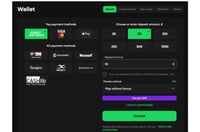
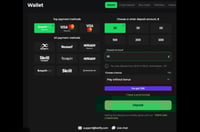
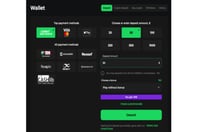
Betify offers a wide range of payment methods for both deposits and withdrawals, including bank cards, cryptocurrencies and e-wallets. This guide explains how payments work at Betify, which methods are commonly available, and what to check before funding your account or requesting a withdrawal.
Payment options can vary depending on your country, so the exact methods available to you will usually be shown inside the cashier once you log in. Betify supports both fiat and crypto-friendly account funding, making it a practical option for users who want more than one way to manage deposits and withdrawals.
Available Betify Payment Methods
Betify supports a broad mix of payment types, with options including Visa, Mastercard, Bitcoin, Dogecoin, Ethereum, Litecoin, Tether, Tron, Neteller, Skrill, Payz and Interac.
The wide mix gives users a good choice between standard payment routes, e-wallet convenience and cryptocurrency transactions.
Payment Options at a glance
Payment Type
Methods
Best For...
Bank cards
Visa, Mastercard
Fast and familiar deposits
Cryptocurrency
BTC, DOGE, ETH, LTC, USDT and Others
Crypto funding and withdrawals
E-wallets
Neteller, Skrill, Payz
Flexible digital wallet use
Local Options
Interac
Country-specific convenience
Betify Deposits
Making a deposit at Betify is designed to be quick and simple. Once you are logged in, open the cashier, choose your preferred payment method, enter the amount you want to deposit, and follow the instructions shown on screen. The available methods and currencies shown in the cashier will depend on your account and country settings.
To deposit at Betify:
Log in to your Betify account.
Open the Cashier or deposit section.
Choose your preferred payment method.
Select the currency and enter the amount you want to deposit.
Complete the payment using the on-screen instructions.
Return to your balance once the transaction has been confirmed.
If you are a new user, it is worth checking that your account currency is correct before making your first deposit. Your registration page already highlights country and currency selection as part of sign-up, so this is one of the first details to get right.
The minimum deposit varies based on the payment method you are using.
For Bitcoin deposits, the minimum is 0.0001 BTC or equivalent in another cryptocurrency.
For deposits made with credit cards, debit cards, eWallets or by Bank Transfer, the minimum amount is $20 or currency equivalent.
Betify Withdrawals
Withdrawals are handled through the same cashier area. Once you are logged in, choose the withdrawal option, select the method available to your account, enter the amount you want to cash out, and submit the request. Since payment options can vary by market, the withdrawal methods shown to one user may not be identical to those shown to another.
Here is a step-by-step guide to making a withdrawal:
Sign in to your Betify account.
Click the ‘Cashier’ button which you will find at the top of the screen when you are logged in to your account.
Click on the ‘Withdrawal’ button.
Select the payment method you want to use for your withdrawal request.
Type in the amount of money you want to withdraw and follow the on-screen instructions to complete the request.
Your withdrawal will then be processed.
Withdrawal times can vary depending on the payment method you use. Crypto withdrawals are often among the faster options, while some other methods can take longer.
Betify Welcome Offers
New players can enter a promo code during registration if they want to claim a welcome offer. Use NEWBONUS for sportsbook or MAXBET for casino. For full bonus details, read our Betify promo code guide.
Betify Crypto
You can deposit at Betify using many different cryptocurrencies.
If you require it, step-by-step crypto deposit guidance is available through the cashier. For users who prefer crypto betting and gaming, this gives Betify a wider payments profile than a cards-only platform.
To make a crypto deposit at Betify:
Log in to your Betify account.
Open the cashier and go to the deposit section.
Select Crypto Deposit.
Choose the cryptocurrency you want to use.
Follow the wallet instructions shown on the screen.
Complete the transfer from your crypto wallet.
Wait for network confirmation before the funds appear in your account.
The main advantage of crypto payments here is flexibility. You can fund an account with widely recognised coins while still keeping access to more traditional payment methods if needed.
Accepted crypto coins at Betify include:
Binance Coin (BNB)
Bitcoin (BTC)
Dogecoin (DOGE)
Ethereum (ETH)
Litecoin (LTC)
Ripple (XRP)
Solana (SOL)
Tether (USDT)
TRON (TRX)
Other crypto options may also be available to you, and crypto deposits are generally processed quickly. Always check the latest terms and cashier information for the payment method you choose.
Card Payments at Betify
Betify also supports card payments, including Visa and Mastercard, giving users a familiar way to fund an account without using crypto or e-wallets.
Here is a step-by-step guide to making a deposit using a credit card or debit card:
Log in to your Betify account.
If you are yet to register, click the ‘Sign Up’ button and complete the short registration form.
Confirm the country you live in and select the currency you want to use for your deposit.
Once you have signed in to your account, click on ‘Cashier’ and then select ‘Deposit’.
Choose Visa, Mastercard or another available card option from the list of payment methods.
Enter the amount you want to deposit and complete the payment using the instructions shown in the cashier.
As soon as the transaction has been confirmed, the money will appear in your Betify account.
E-Wallets and Regional Methods
Betify also accepts wallet-style and regional payment options including Neteller, Skrill, Payz and Interac. These methods can be especially useful for users who already manage online payments through digital wallets or want an option that fits local banking habits more closely.
As with all payment methods at Betify, availability depends on country and account setup. The most accurate list will always be the one shown after login inside the cashier.
Payment Tips
Before making your first deposit or withdrawal at Betify, keep the following points in mind.
Check which payment methods are available in your country.
Make sure your selected account currency is correct.
Use the cashier to confirm the latest methods linked to your account.
Follow the payment instructions carefully, especially when sending crypto.
Choose the method that best matches how you plan to deposit and withdraw.
You can deposit at Betify using a wide range of payment methods, including credit cards, debit cards, Bitcoin and many other crypto coins. Neteller, Skrill, Interac and many other payment options are also available.
How do I deposit at Betify?
To deposit funds at Betify, sign in to your account and then click the ‘Cashier’ button at the top of the screen.
Next, select ‘Deposit’ from the on-screen menu and you will see a list of available payment methods.
Choose your preferred payment option from the list and type in the amount of money you want to deposit.
Finally, click to confirm the deposit. The money will appear in your account as soon as the transaction has been completed.
How long do Betify withdrawals take?
Withdrawal times can vary depending on the payment method you use. Some methods are faster than others, so the best guide is the option shown inside your cashier when you are logged in.